

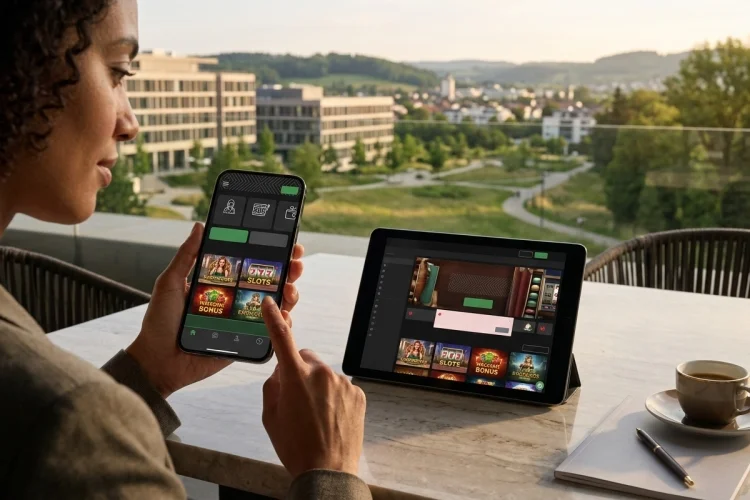
A casino may look impressive on a desktop computer but become frustrating when opened on a phone.
Tiny buttons, slow-loading games, broken menus, and complicated payment pages can turn a simple session into a difficult experience.
These problems matter because mobile users often register, verify accounts, deposit, play, and request withdrawals from the same small screen.
Learning how to choose a mobile-friendly casino means evaluating more than whether the homepage fits your device.
A strong mobile platform should load reliably, respond quickly to taps, display games correctly, protect account data, and provide straightforward access to banking and safer gambling controls.
It should also be licensed for your location and work consistently across common browsers or an official application.
The following checks help separate a genuinely mobile-optimised casino from one that has merely reduced the size of its desktop website.
They can also help you avoid platforms that prioritise promotions while neglecting usability, security, or player protection.
Verify the Licence First
Mobile quality means little if the casino is not authorised for the player’s location. Find the legal company, regulator, licence number, and domain in the footer or terms, then compare them with the regulator’s official register.
The UK Gambling Commission’s register can be searched by business name, trading name, or domain. It also displays licence status and regulatory actions.
The exact website address should match because a copied licence logo is not sufficient proof that the mobile casino is regulated.
Check Responsive Design and Navigation
A mobile casino should adapt to different screen sizes without horizontal scrolling or constant zooming.
Google recommends responsive web design because one URL and the same core content can serve different devices while the layout adjusts to the available screen.
Menus, game filters, account settings, promotions, and the cashier should remain easy to reach. Buttons must also be large and separated enough to prevent accidental taps.
W3C mobile guidance covers touch-target size, screen reflow, orientation, and alternatives to complicated touch gestures.
Test Speed and Visual Stability
Open the casino on both Wi-Fi and mobile data. The lobby, account page, game information, and cashier should load without frozen animations, repeated reloads, or controls that move while you try to tap them.
Google’s Core Web Vitals assess real-world loading performance, responsiveness, and visual stability.
These qualities matter on casino pages because slow feedback or shifting payment buttons can create confusion and cause users to repeat an action unnecessarily.
Do not judge performance from the homepage alone. Open several games and account pages to see whether the experience remains consistent.
Compare Browser Play, Apps, and Games
A responsive browser site requires no installation, while an official app may offer biometric login, device notifications, and faster account access. Download applications only from a verified operator page or recognised app store.
Apple requires real-money gaming apps to hold the necessary licences, remain geo-restricted to authorised locations, and be free on the App Store.
Google Play also applies licensing and geographic-access requirements to eligible gambling apps. App-store availability is useful, but it does not replace checking the gambling regulator.
Open several slots, table games, and live-dealer titles. Rules, paytables, balances, and controls should remain readable in both portrait and landscape modes.
Examine Payments and Verification
The mobile cashier should clearly display deposit limits, withdrawal methods, processing estimates, fees, and supported currencies.
Forms must be readable, error messages should explain what needs correction, and confirmation screens should show the amount before submission.
Test whether identity verification can be completed securely from a phone. Avoid operators that request sensitive documents through informal messaging services.
Before depositing, confirm that your preferred payment method can receive withdrawals and is registered in your own name. Licensed remote operators may also be required to comply with technical and security standards covering their gambling systems.
Review Security and Player Controls
Choose a platform with secure login, a clear privacy policy, and multi-factor authentication where available. Use a unique password and keep the phone, browser, and casino application updated.
Deposit limits, time-outs, transaction history, reality checks, support information, and self-exclusion should be easy to find on mobile. These tools should not disappear simply because the customer is using a smaller screen.
Be cautious when game promotions are highly visible but withdrawal information and player controls are hidden inside complicated menus.
Choosing a mobile-friendly casino requires more than finding a site that opens on a smartphone.
The best platforms combine responsive design, quick and stable pages, usable games, clear mobile payments, secure account controls, and visible responsible gambling tools.
They should also hold a licence that can be verified for the exact domain and the player’s jurisdiction. Test the service before committing significant funds.
Explore the lobby, open several games, inspect the cashier, contact support, and read the withdrawal conditions on your own device and network.
Choose an official app or verified browser site, use strong authentication, and set spending and time limits before playing.
When navigation, payment information, licensing, or safety controls are unclear, leave the platform and continue your search.